The best laptop backpack starts with one measured device
There is no best laptop backpack brand for every computer and commute. The useful choice is the exact model whose compartment accepts your closed laptop in its normal case, whose opening lets that device pass without forcing a corner, and whose remaining layout handles the charger, lunch, documents and layer you actually carry. A brand name or screen diagonal can create a shortlist; neither settles the purchase.
Measure the laptop's width, depth and thickness, then repeat with any shell or sleeve that stays on it. Write the numbers in the same order as the bag manufacturer uses. Add the largest rigid accessory and decide whether it may share the device area. The smallest dimension is often the constraint: a thick mobile workstation can fail a nominally large sleeve even when its width and depth look comfortable.
Screen class and chassis size are different measurements
Apple's current 15-inch MacBook Air measures 13.40 × 9.35 × 0.45 inches, while the current 14-inch MacBook Pro measures 12.31 × 8.71 × 0.61 inches. The model with the larger screen class is wider and deeper but thinner. Those current Apple specifications show why 'fits 15-inch' and 'fits 16-inch' cannot be treated as standard compartment rectangles.
Generation matters too. A future model or a same-size Windows workstation can use a different chassis, and a hard shell can change all three dimensions. Record the exact device model or measure it yourself. If a backpack page supplies only a diagonal label, treat the physical fit as unresolved rather than borrowing a measurement from a different laptop or an earlier bag generation.
Four exact models show what useful specifications look like
Light 22L option: Case Logic Key Plus 3204194. Case Logic publishes a 15.2 × 1.2 × 10.4-inch laptop compartment, 11.8 × 10.2 × 17.7-inch exterior and 1.19-pound empty weight. Its up-to-15.6-inch wording is less useful than those physical numbers. This is the compact choice when a laptop, tablet, folders and small accessories make up most of the load.
Multi-access 27L commuter: Thule Paramount 3205016. Thule publishes a 15.75 × 10.25 × 0.75-inch compartment, 13.6 × 8.3 × 20.3-inch exterior and 2.4-pound weight. The manager-verified marketplace title says 16 inches while the exact manufacturer page says up to 17 inches. Preserve that conflict and use the physical compartment plus an insertion check.
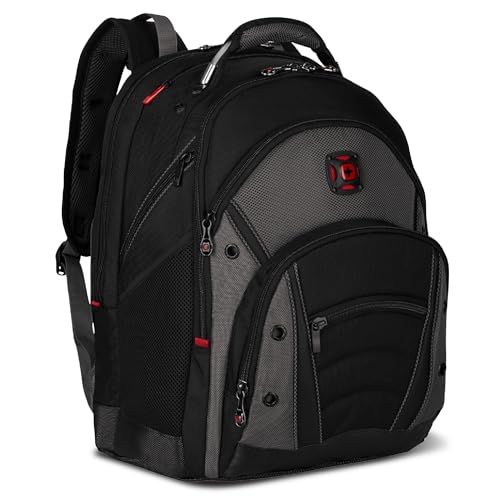
Larger-device 27.5L layout: Wenger Ibex 27316060. The official Ibex specification lists 14.25 × 11 × 1.25 inches for the laptop compartment and 3.6 pounds empty. Measured 26L alternative: Wenger Synergy 27305140. Its compartment is 14 × 10.25 × 1.25 inches and it weighs 3.2 pounds. The difference is consequential for a wide laptop, but neither published rectangle supplies zipper-opening clearance.
A compartment rectangle is not an opening measurement
None of these four manufacturers publishes the usable laptop-opening width. Padding, tapered corners, a retaining strap and the zipper path can make the insertion route smaller than the interior rectangle. Ask for the usable opening at its narrowest point when the device is close to a limit. Do not plan to stretch the fabric, compress a hard shell or scrape the computer past zipper teeth.
Pack the main compartment before testing. A lunch container, document file or jacket can bow into a shared sleeve and change access. Insert and remove the computer at the angle used beside a desk or on transport, not only with the empty bag lying flat. A technical fit that requires unloading the entire backpack is a poor commute fit even when the zipper eventually closes.
Choose the access pattern around the workday
Paramount's documented back-zip laptop access separates device retrieval from its fold-top and side routes into the main load. Ibex uses a lay-flat electronics area, while Key Plus uses an elevated pocket and Synergy divides chargers into zip mesh pockets. These are different workflows, not a best-to-worst ranking. Choose the route that works in the smallest place where the laptop normally comes out.
Then assign the rest of the load. Keep a dense power brick away from the laptop face, give a bottle a pocket that remains usable when the bag is full and check whether papers stay flat. Include empty bag weight in the calculation: the examples range from 1.19 to 3.6 pounds before the computer is added. Padding and shoulder-strap language do not prove loaded comfort, a safe load or drop survival.
Shortlist by constraints, not by a universal winner
Start with Key Plus when the 22-liter, low-empty-weight layout clears the device and a modest work load. Consider Paramount when three access routes and 27 liters solve a multi-stop city commute. Compare Ibex when a larger device and lay-flat electronics area justify its greater exterior and 3.6-pound starting weight. Compare Synergy when its slightly smaller measured compartment and 26-liter organization clear the same job with less empty weight.
Open the side-by-side model comparison for three distinct approaches, then read the selected exact model page. Before ordering, verify model number, cased-device dimensions, opening, seller and return eligibility. Keep packaging until an indoor packed-fit rehearsal succeeds; no screen label or recommendation replaces that final check.
Related questions
What is the best laptop backpack to buy?
Buy the exact model that clears the cased laptop's width, depth and thickness, provides enough opening clearance and keeps device access workable with the ordinary commute load. Case Logic Key Plus, Thule Paramount 27L and Wenger Ibex or Synergy are measured examples for different jobs, not a universal quality ranking.
Will a 16-inch laptop fit in a 15.6-inch backpack?
Possibly, but the labels cannot settle it. Compare the closed device in its normal case with the compartment's three physical dimensions and the usable opening, then test removal with the rest of the bag packed.
Are backpack exterior dimensions enough to check laptop fit?
No. Exterior measurements include fabric, padding and other compartments. Use laptop-compartment dimensions, the narrowest opening and an exact-model fitting check instead.